
VPC Flow Logs
VPC Flow Logs are a feature that enables you to capture information about the IP traffic going to and from network interfaces in your VPC.
You can create a flow log for a VPC, subnet, or network interface.
If you create a flow log for a subnet or VPC, each network interface in that subnet or VPC is monitored.
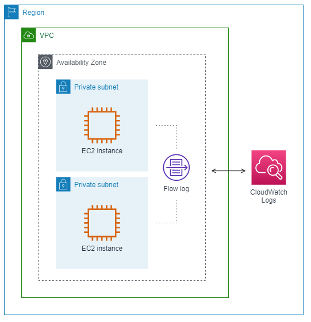
To create a flow log, you specify:
The resource for which to create the flow log,
The type of traffic to capture (accepted traffic, rejected traffic, or all traffic),
The destinations to which you want to publish the flow log data (CloudWatch Logs, S3 or Amazon Data Firehose).
After creating a flow log, you can retrieve and view the flow log records. Flow logs can help you with several tasks, such as:
Diagnosing overly restrictive security group rules,
Monitoring the traffic that is reaching your instance,
Determining the direction of the traffic to and from the network interfaces.
If you publish the Flow Log to CloudWatch Logs, you can query it using Log Insights.
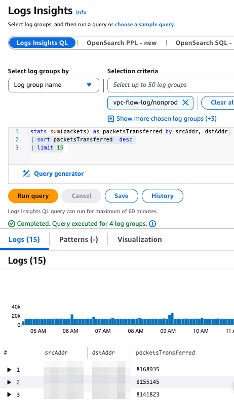
Subtitles are available in English, French and Spanish. Click here to get the full masterclass.
How to identify?
Use Log Insights to find cost anomalies. VPC Flow Logs can be a valuable resource for identifying and addressing cost anomalies in your AWS environment. Here are some examples:
Unused or Underused Resources: Check if there is any network traffic to and from these resources. If not, they might be candidates for termination or resizing.
Excessive Data Transfer: Detect high volumes of data transfer between availability zones or regions, which can incur additional costs.
Unauthorized or Malicious Traffic: Identify unusual traffic patterns that may indicate unauthorized access or malicious activity, such as data exfiltration.
High Traffic from Specific IPs or Services: Identify specific IP addresses or services generating a disproportionate amount of traffic, which might indicate inefficient application design.
How to fix?
Create a VPC Flow Logs group and publish it on CloudWatch Logs.
Use the sample queries provided by AWS to investigate the traffic.
Understand your workload’s traffic usage and find the anomalies.
Contact AWS Support to help you understand excessive costs.