
A secret in AWS Secrets Manager is considered unused when it is no longer needed but continues to incur monthly charges. Deleting unused secrets helps reduce costs and improve security.
Subtitles are available in English, French and Spanish. Click here to get the full masterclass.
How to identify?
You can identify unused Secrets Manager secrets using the following methods:
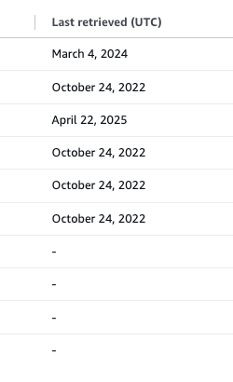
In AWS Console, navigate to the Secrets Manager service. Check the Last Retrieved column for each secret. Secrets with no recent retrieval activity may be unused:
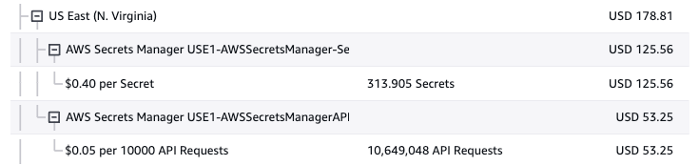
In AWS Console, go to Billing and Cost Management, then select the Bills section. Click on Secrets Manager, followed by your region. If there are no API requests in a region for a given month, the secrets in that region were not used:
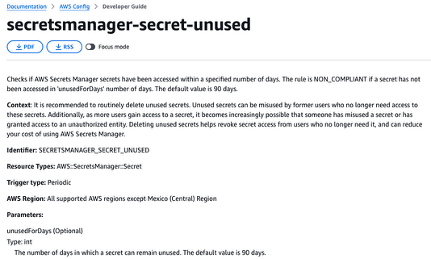
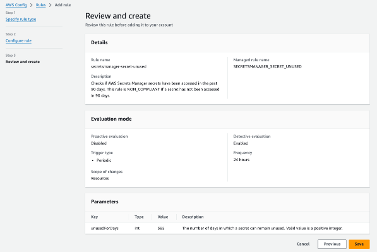
In AWS Config or Security Hub, create the managed rule secretsmanager-secret-unused. Modify the unusedForDays parameter to specify the number of days a secret can remain unused (default: 90 days):
How to fix?
Ensure the secret will not be needed in the future before deletion.
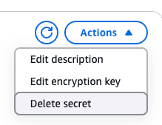
In AWS Console, go to the Secrets Manager service. Click on the secret you want to delete, then select Actions > Delete Secret:
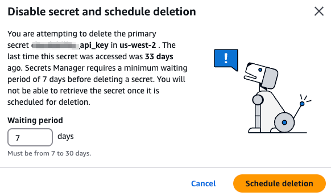
Set the waiting period to 7 days and click Schedule Deletion:
Note: If secrets are provisioned automatically (e.g., via CloudFormation or Terraform), update your infrastructure-as-code (IaC) to reflect these changes.