 Amazon EBS Snapshots cost 50% less than EBS Volumes, but costs can accumulate quickly—especially with automatic snapshots. We recommend archiving or deleting snapshots older than 1 year. Archived snapshots cost 75% less, but retrieval incurs an additional cost.
Subtitles are available in English, French and Spanish. Click here to get the full masterclass.
How to identify?
You can identify old or unused EBS Snapshots using the following methods:
From our Cost Optimizations Report, look at the section EBS - Old Snapshots.
In AWS Console, navigate to the EC2 service, then select the Snapshots section. Filter by Started to identify the oldest snapshots. Filter by Volume size to prioritize larger snapshots (cost: $5/month per 100GB stored).
In AWS Console, go to Billing and Cost Management, then select the Bills section. Click on Elastic Compute Cloud (EC2), choose your region, then EBS, and search for "snapshot". If snapshots exist, you will see a line item like this:

In the example above, approximately $800 was spent on snapshots for the selected period and region. Deleting all snapshots (if appropriate) could save 100% of this cost—$800—with just a few clicks.
How to fix?
For Archiving:
If you want to retain the snapshot, consider archiving it. Refer to the official guide: Archive Amazon EBS snapshots - Amazon EBS.
Minimum archive period: 90 days.
Restoration time: Up to 72 hours, depending on snapshot size.
Note: Do not archive daily incremental snapshots.
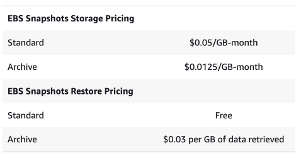
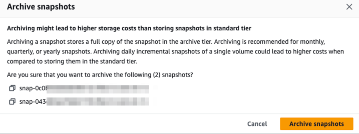
In AWS Console, go to the EC2 service, then select the Snapshots section. Filter by Started to find the oldest snapshots. Select the snapshots you want to archive, then click Actions > Archiving > Archive Snapshot.
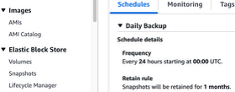
Go to Lifecycle Manager to review your lifecycle policies for automatic snapshots.
For Deletion:
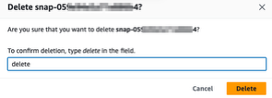
Ensure the snapshot is no longer needed before deletion. In AWS Console, go to the EC2 service, then select the Snapshots section. Filter by Started, select one or more snapshots, and click Actions > Delete Snapshot. Confirm the deletion in the popup.
Note: If snapshots are provisioned automatically (e.g., via CloudFormation or Terraform), update your infrastructure-as-code (IaC) to reflect these changes.