
AWS CloudTrail supports multiple trails, including trails that monitor the same events. The Security team usually creates a Management Events trail in every AWS account for audit purposes— this trail is free. However, creating additional Management Events trails that duplicate recorded events will incur fees.


Subtitles are available in English, French and Spanish. Click here to get the full masterclass.
How to identify?
You can identify duplicate CloudTrail trails using the following methods:
From our Cost Optimizations Report, check at CLOUDTRAIL_Duplicate_Trails section.
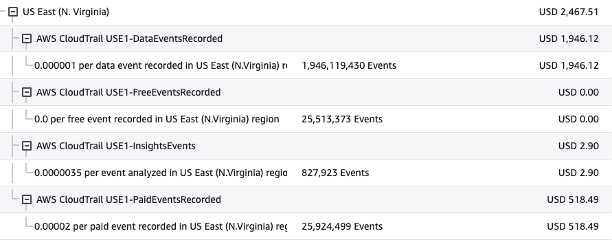
In AWS Console, navigate to the Cost Explorer service. Filter by Usage Type = <Region>-PaidEventsRecorded. This indicates duplicate events being recorded.
In AWS Console, go to Billing and Cost Management, then select the Bills section. Click on CloudTrail, followed by your region. If you see PaidEventsRecorded, you have duplicate trails:
How to fix?
Review your CloudTrail trails to identify and avoid duplicate Management Events trails. Analyze API activity to confirm redundancy:
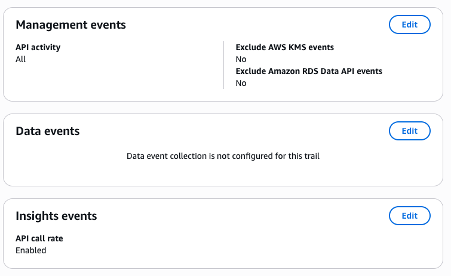
In AWS Console, go to the CloudTrail service, then select the Trails section. Choose the trail you want to remove and click Delete, or stop logging if the trail is no longer needed.
Note: If CloudTrail trails are provisioned automatically (e.g., via CloudFormation or Terraform), update your infrastructure-as-code (IaC) to reflect these changes.