
The AWS cost of supporting previous-generation database instances can be significantly higher compared to newer, more efficient, and cost-effective options. Previous-generation instances include older families and types that have been phased out across multiple services:
RDS - ElastiCache - Redshift - DocumentDB - Neptune
Previous-generation instance types include:
t1, t2
m1, m2, m3, m4
c1, c2, c3, c4
r1, r2, r3, r4
ds
dw
dc1
You can upgrade to newer generations (e.g., t4g, m7, c7, r7) : See all instance types
Always consider migrating your instances to Graviton at the first opportunity.
Subtitles are available in English, French and Spanish. Click here to get the full masterclass.
How to identify?
You can identify previous-generation database instances using the following methods:
From our Cost Optimizations Report, check at RDS_Rightsize section.
In AWS Console, navigate to the dedicated service (e.g., RDS, ElastiCache). Filter by Instance Type and compare with the list above.
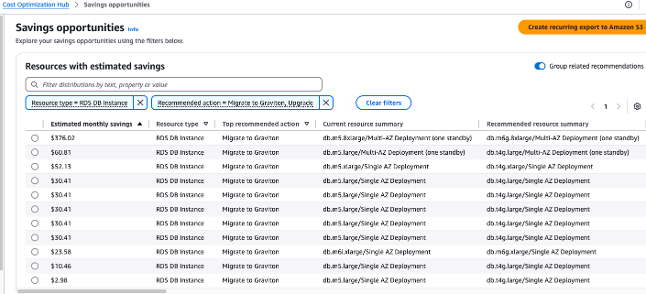
In AWS Console, go to the Cost Optimization Hub and filter by RDS Instance with the recommended action set to Upgrade or Migrate to Graviton:
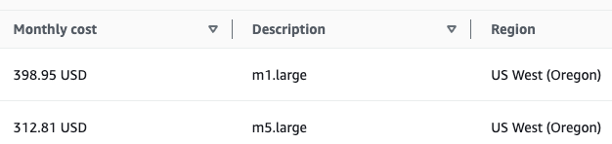
In AWS Console, go to Billing and Cost Management, then select the Bills section. Click on your service (e.g., RDS), followed by your region, and search for instance types to compare with the list.
- To estimate savings, go to https://calculator.aws/. For example, upgrading 1 RDS Instance (m1.large to m5.large in Oregon) can save you $86 per month, or 22%.
How to fix?
Upgrading instance families is relatively easy. However, you must stop the database instance before changing its type.
Changing the instance type requires a restart and will cause brief downtime for Single-AZ deployments. This downtime is reduced with Multi-AZ, but still exists. For production environments, take extra precautions.
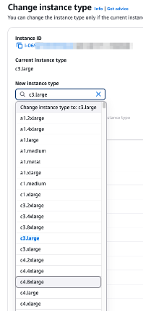
In AWS Console, go to your dedicated service (e.g., RDS). Select the instance, then click Actions to change the instance type. Click Continue, then Apply Immediately.
What about moving from intel (m6i, m7i) to ARM/graviton (r6g, r7g, r8g)?
The benefit of RDS is that as a managed service, AWS takes care of all the driver and architecture differences between x86 & ARM, so that you do not have to deal with any incompatibility.
If your database instances are provisioned automatically (e.g., via CloudFormation or Terraform), update your infrastructure-as-code (IaC) to reflect the new instance type.