
When creating an ElastiCache cluster in AWS, you have 2 primary deployment options — Serverless or Node-based (Provisioned) — and 3 engine options — Redis OSS, Memcached or Valkey released late 2024.
ElastiCache for Valkey introduces significant enhancements to Redis while retaining its core functionality, making it more powerful and versatile.
On-Demand ElastiCache for Valkey Serverless is priced 33% lower compared to Redis OSS Serverless.
On-Demand ElastiCache for Valkey node-based is priced 20% lower compared to Redis node-based.
Subtitles are available in English, French and Spanish. Click here to get the full masterclass.
Secondary Cost Optimization Levers
Lower Storage Minimums: ElastiCache Serverless for Valkey has a minimum data storage of 100 MB, which is 90% lower than the 1 GB minimum for Redis OSS.
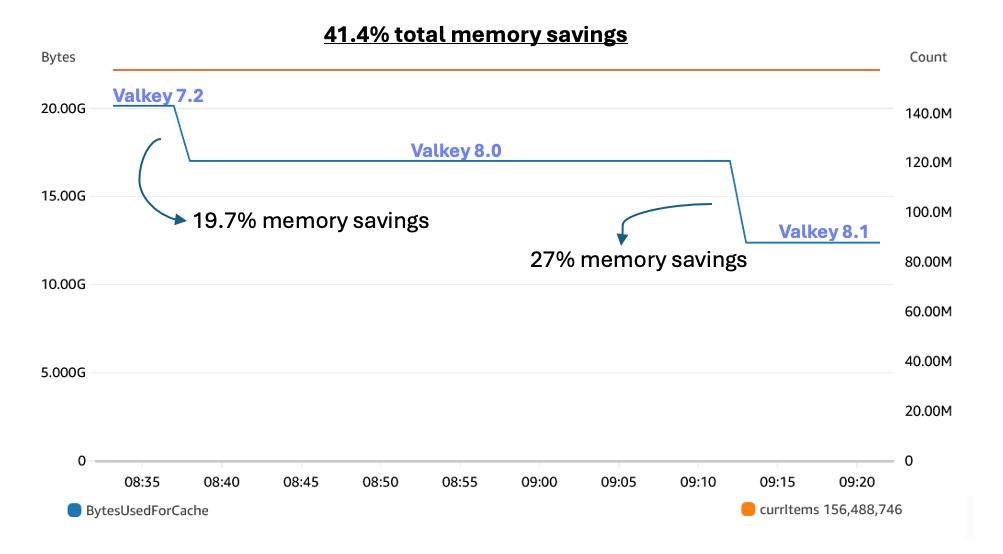
Memory Efficiency & Rightsizing: Valkey 8.x versions reduce memory usage by approximately 20-40% per key compared to Redis OSS. This improvement often allows you to downsize your node types (e.g., from r7g.xlarge to r7g.large), potentially yielding up to 60% total savings.
Reserved Instance (RI) Portability: Existing Redis OSS Reserved Nodes automatically apply to Valkey nodes within the same instance family and region.
How to identify?
You can identify opportunities to migrate to Valkey using the following methods:
From our Cost Optimizations Report , check at ELASTICACHE_Redis_To_Valkey section.
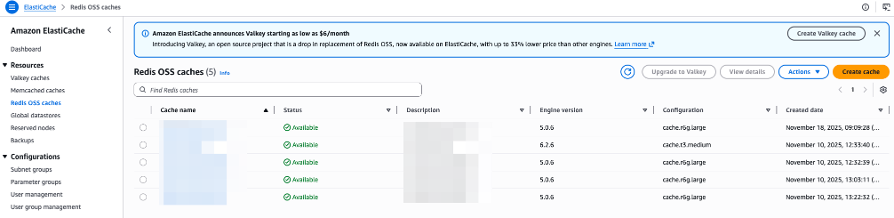
- In AWS Console, go to ElastiCache to see which engine you’re currently using.
How to fix?
Step 1: Create a Valkey Cluster
Go to the AWS ElastiCache Console.
Click Create cluster.
Select Valkey as the engine.
Configure the cluster with the same settings as your Redis cluster (node type, number of nodes, etc.).
Click Create.
Step 2: Migrate Data
Use Redis Replication (if both clusters are in the same region):
redis-cli -h <REDIS_ENDPOINT> --replicaof <VALKEY_ENDPOINT> <VALKEY_PORT>
Wait for synchronization to complete.
Verify data integrity by comparing keys between Redis and Valkey.
Step 3: Update Application Configuration
Update your application to point to the Valkey endpoint instead of Redis.
Test thoroughly to ensure compatibility.
Step 4: Delete the Old Redis Cluster
Once confirmed that Valkey is working correctly, you can delete the old Redis cluster to avoid double billing.