
If over-provisioned, RDS instances can cost a lot. Let’s see how to reduce costs without breaking normal usage.
Rightsizing means changing the instance type to meet actual needs. For example, you could downgrade from a 4xlarge to an xlarge instance.
Match instance types and sizes to your workload at the lowest cost without compromising performance.
Before rightsizing: Consider upgrading the engine type:
- PostgreSQL Releases
- MySQL Releases
Consider also upgrading RDS GP2 volumes to GP3 for more IOPS at no extra cost.
Subtitles are available in English, French and Spanish. Click here to get the full masterclass.
How to identify?
You can identify over-provisioned RDS instances using the following methods:
From our Cost Optimizations Report, check at RDS_Rightsize section.
In AWS Console, go to the RDS service, then select the Databases section. Click on the Settings logo and filter by CPU. Select a database with low CPU usage. Go to the Monitoring tab and adjust the timeline to at least the last 4 weeks (6 months is recommended). Confirm that the CPU Utilization (%) graph is low.
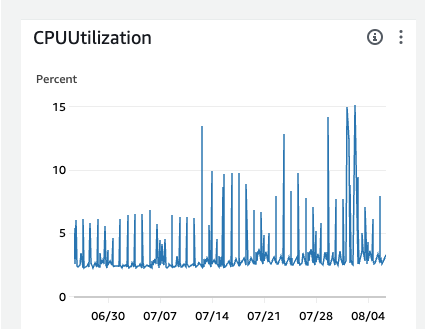
By having 15% max CPU in that period, you could say you could safely reduce by 4 the provisioned CPU.
Check Freeable Memory as well.
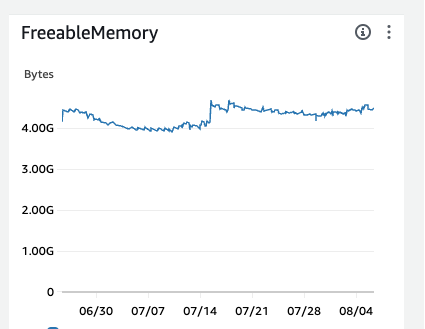
Then, check your instance type or class and compare your current vCPU and Memory with other classes.
Ensure that the network won’t be impacted when rightsized. If necessary, review your database’s network metrics.
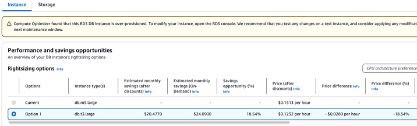
In AWS Console, go to AWS Compute Optimizer, then select the RDS DB Instances section for tailored recommendations.
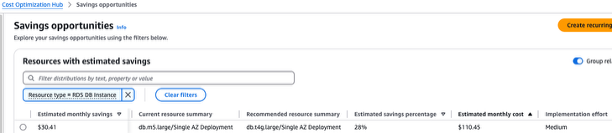
In AWS Console, go to Cost Optimization Hub. Filter savings opportunities by RDS DB Instance and Recommended action = Rightsize.
How to fix?
Note: There will be a brief downtime when the instance class is changed. Consider creating a backup or snapshot beforehand.
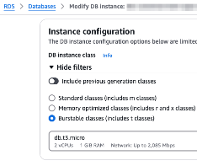
In AWS Console, go to the RDS service, then select the Databases section.
Choose a database, then click Modify.
Go to Instance configuration and change the DB Instance class.
In Storage, modify gp2 to gp3.
Click Continue. If you want to apply changes immediately, select Apply immediately, then click Modify DB instance.
If the resource is provisioned automatically via IaC (such as CloudFormation or Terraform), update the corresponding code to reflect the changes.