
When you create a volume, it might be over-provisioned.
In GP3 and IO1/IO2 volume types, you are charged for IOPS and/or Throughput if they exceed the minimum values (3000 IOPS / 125 MB/s).
IOPS (Input/Output Operations Per Second) measures the speed at which data can be read and written to the storage device. Higher IOPS indicates faster performance.
Throughput refers to the amount of data (measured in Megabytes per second) that can be transferred to or from a storage device in a given amount of time.


Subtitles are available in English, French and Spanish. Click here to get the full masterclass.
How to identify?
You can identify over-provisioned EBS volumes using the following methods:
From our Cost Optimizations Report, check at EBS_Rightsize section.
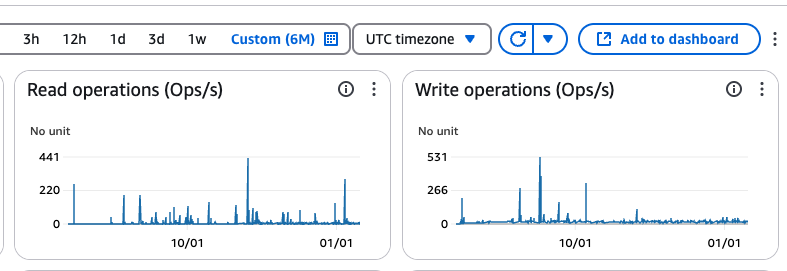
In AWS Console: Go to the EC2 service, then select the Volumes section. Select volumes of type gp3 or io1 or io2. Click on a volume and go to the Monitoring section. Look at the IOPS (often set to 3000) and compare it to the Read and Write Operations graphs over a timeline of 6 months.
In Cost Optimization Hub, you can see a graph per resource type.
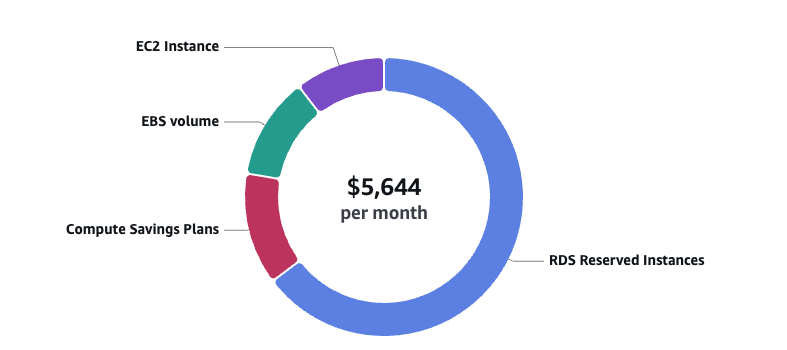
If you see an EBS volume, click on View opportunities.
Filter by EBS volume and check the Top recommended action = Rightsize
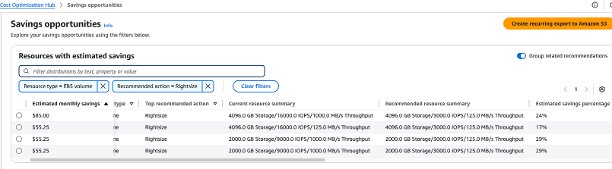
In Compute Optimizer, look at EBS Upgrade recommendations.

How to fix?
In AWS Console, go to EC2 service, then select the Volumes section. Select a volume, then click Edit. Change the volume IOPS. Confirm the modification.
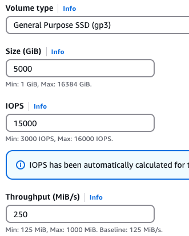
Note: Downtime does not occur during this change; migration is managed in the background.
If the resource is provisioned automatically via IaC (such as CloudFormation or Terraform), update the corresponding code to reflect the changes.