
Single-AZ Redis clusters run primary nodes only - no replicas, no cross-AZ replication - cutting cluster cost by 50%+ compared to Multi-AZ setups.
This option is ideal for workloads that do not require automatic failover e.g. Dev/Sandbox env’s.
Multi-AZ (with replicas) should only be allowed for production (prod) accounts.
How it works
Multi-AZ Redis clusters replicate data from the primary to one or more replicas in separate Availability Zones.
If the primary fails, ElastiCache automatically promotes a replica and updates the primary endpoint, providing continuous availability, without loss of the connectivity or data
Sandboxes and Non-Prod accounts must use Single-AZ (no replicas).
Single-AZ clusters cost a fraction of Multi-AZ and are ideal for dev/test workloads where data can be rebuilt or repopulated if a node is lost.
Savings scale with the replica-to-total-node ratio: a sharded cluster with 1 primary + 1 replica per shard saves ~50% when replicas are removed; a non-sharded 1-primary + 2-replica cluster saves ~66%.
The application should tolerate cache loss - without replicas, AWS maintenance events, AZ disruption, or node failure will make the cache temporarily unavailable until the node recovers. Cache-aside patterns and workloads that can fall back to the database are good fits.
ElastiCache Pricing Page: Amazon ElastiCache Pricing
How to identify?
- From our Cost Optimizations Report, check at ElastiCache_MultiAZ_NonProd section.
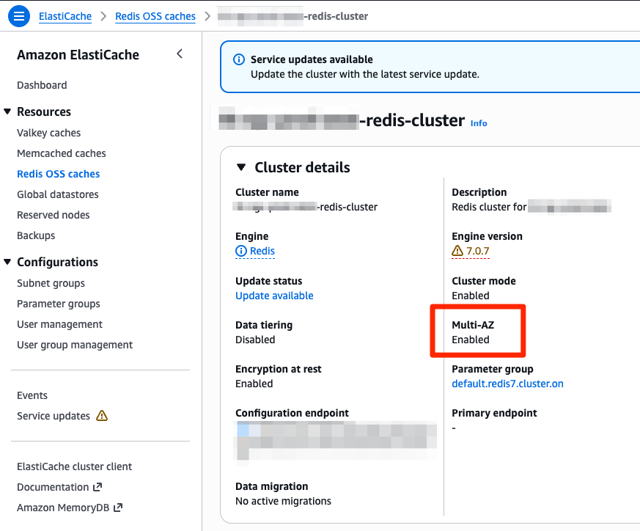
- In AWS Console, navigate to Amazon ElastiCache > Redis caches > check the Multi-AZ column. If it shows "Enabled", the cluster has cross-AZ replicas. Any cluster with replicas > 0 in a non-prod account is a candidate.
How to fix?
ElastiCache lets you reduce replica count and disable Multi-AZ in place - no recreation needed in most cases.
Create a Backup: Take a manual snapshot of the cluster (ElastiCache > Backups > Create backup) before making changes.
Disable Multi-AZ: Modify the replication group and set Multi-AZ to Disabled.
Reduce Replicas to Zero:
Use the console's Modify action
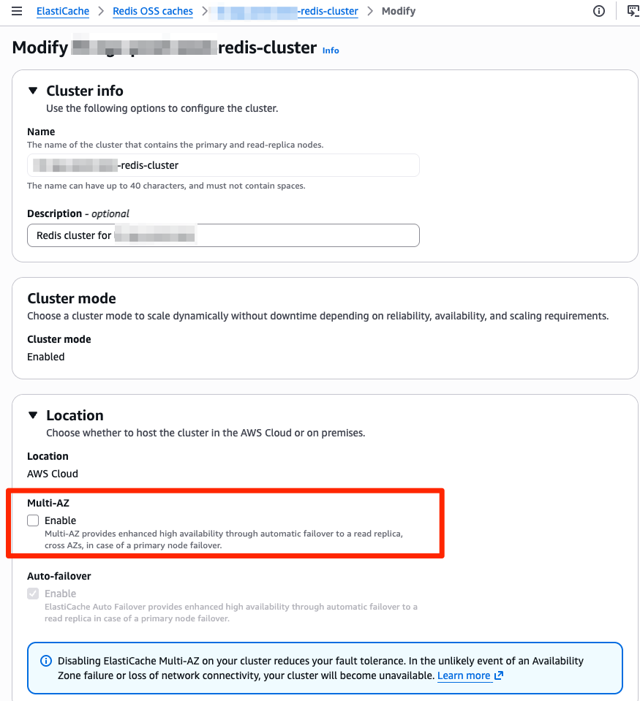
b. Run aws elasticache decrease-replica-count --replication-group-id <id> --new-replica-count 0 --apply-immediately. For sharded clusters this applies uniformly across all shards.
c. Update Terraform config to the desired settings, the terraform should allow for the ~in-place update of the cluster
4. Update Client Configurations: Any client using a reader endpoint must be repointed at the primary endpoint.
5. Test and Switch: Validate the application against the reduced cluster before considering the change complete.
If in-place modification isn't supported on an older cluster, create a new Single-AZ cluster, restore from snapshot, update connection strings, then decommission the old one.
Why This Matters
Compliance: Ensures non-production environments follow cost-saving policies.
Cost Efficiency: Reduces unnecessary spending on high-availability features where they aren't required.
Bonus: Also consider right-sizing node families, reserved nodes for steady-state non-prod, or Serverless ElastiCache for spiky workloads.