 One Zone storage classes store data redundantly within a single Availability Zone (AZ), offering a 47% lower price compared to Standard (Multi-AZ) storage classes. This option is ideal for workloads that do not require multi-AZ resilience.
Regional (Multi-AZ) is only allowed for production (prod) accounts.
Regional file systems provide the highest levels of availability and durability by storing file system data and metadata redundantly across multiple geographically separated Availability Zones within a Region. They are designed to provide continuous availability to data, even when one or more Availability Zones in an AWS Region are unavailable.
Sandbox and NonProd accounts should only use One Zone (Single-AZ) storage.
One Zone file systems redundantly store data within a single Availability Zone (AZ) and are ideal for applications that do not require the Multi-AZ availability and durability offered by Amazon EFS Regional file systems. They are designed to provide continuous availability to data within a single AZ in an AWS Region.
One Zone file systems provide continuous availability within a single AZ and are perfect for applications that do not need the Multi-AZ availability and durability of Amazon EFS Regional file systems.
Using One Zone storage classes can reduce costs by up to 47% and may also improve performance, as data does not need to replicate across multiple AZs.
Subtitles are available in English, French and Spanish. Click here to get the full masterclass.
EFS Pricing Page: EFS Pricing
Tips: Workshop Studio
How to identify?
From our Cost Optimizations Report, check at EFS_MultiAZ_NonProd section.
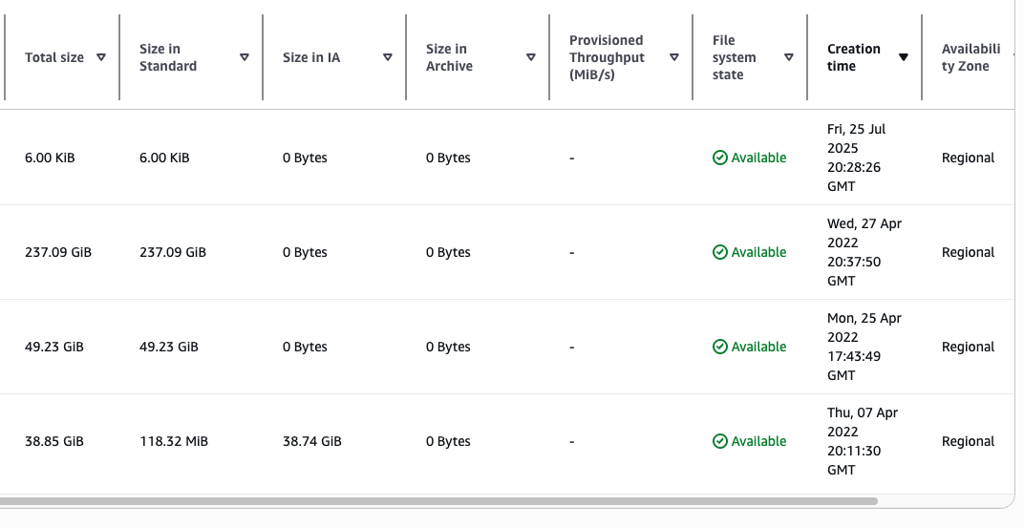
In AWS Console, navigate to Amazon EFS > Check the Availability Zone column. If you see "Regional", it means the file system is Multi-AZ.
How to fix?
To change an Amazon EFS file system from multi-AZ (Regional) to single-AZ (One Zone), you cannot directly modify the existing file system's configuration. Instead, you must create a new One Zone file system and migrate your data to it. Here’s how you can do it:
Create a Backup: Before making any changes, ensure you have a backup of your existing EFS file system. You can use AWS Backup to create a backup of your current Regional file.
Create a New One Zone File System: Set up a new EFS file system with the One Zone storage class in your desired Availability Zone.
Migrate Data: Copy your data from the existing Regional file system to the new One Zone file system. You can use AWS DataSync or other data migration tools to facilitate this process.
Update Mount Targets and Client Configurations: Since One Zone file systems only support a single mount target in the same Availability Zone as the file system, update your EC2 instances or other clients to mount the new One Zone file system instead of the old Regional.
Test and Switch: After migration, thoroughly test the new file system to ensure everything works as expected. Once confirmed, you can decommission the old Regional file system if it is no longer needed.
Why This Matters
Compliance: Ensures non-production environments follow cost-saving policies.
Cost Efficiency: Reduces unnecessary spending on high-availability features where they aren’t required.
Bonus: Check out IA and Archive storage classes to save even more money.