
Automated Snapshots are preferred over Manual Snapshots for multiple reasons:
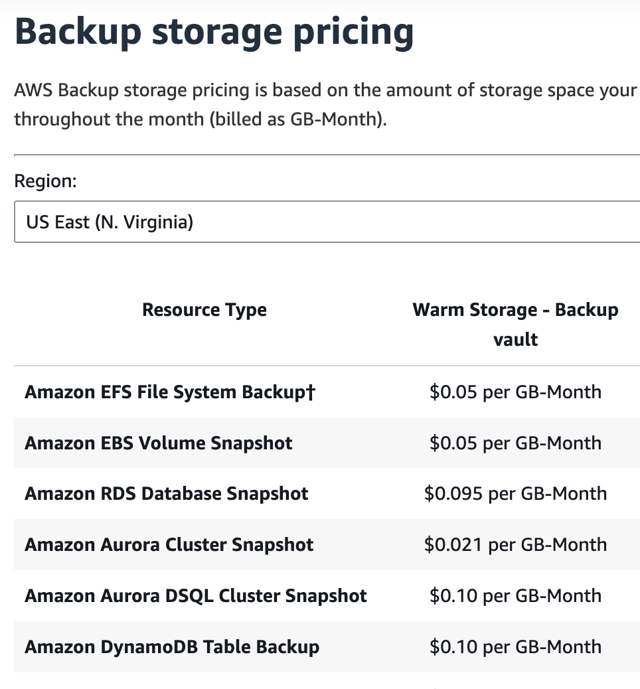
Free Backup Storage Allowance: AWS provides free backup storage equivalent to 100% of your total database storage for each region. If your database is 100 GB, you get 100 GB of automated backup storage for free. Manual snapshots, by contrast, are billed based on their total size ($0.095 per GB-month in most regions), regardless of this allowance.
Automatic Lifecycle Management: Automated snapshots are deleted once they fall outside the retention period (1–35 days), preventing "snapshot bloat" where old, forgotten snapshots pile up and incur charges. Manual snapshots are kept indefinitely until you explicitly delete them.
Incremental Efficiency: Both automated and manual snapshots are incremental, meaning they only store data changes. However, because automated backups are managed system-wide for the instance, they are more efficient at maintaining only necessary data within the retention window, avoiding the costs associated with redundant full-backup manual snapshots.
No Cost for Transaction Logs: Automated backups include transaction logs, which enable point-in-time recovery (PITR) at no extra cost, whereas replicating this level of recovery with manual snapshots would require taking them very frequently, leading to higher storage costs.
Reduced Costs Upon Deletion: When a database is deleted, you can choose to delete its automated snapshots, whereas manual snapshots often remain and continue to accrue storage charges until manually cleaned up.
How to identify?
You can identify unused RDS Manual Snapshots using the following methods:
From our Cost Optimizations Report, check at RDS_Manual_Snapshots section.
In AWS Console, navigate to the Aurora and RDS service, then select the Snapshots section and Manual section. Filter by Snapshot creation time to identify the oldest snapshots. Filter by Storage to prioritize larger snapshots.
AWS Console, go to Billing and Cost Management, then select the Bills section. Click on Relational Database Service, choose your region, then search for "backup storage exceeding free allocation". If snapshots exist, you will see a line item like this:

In the example above, approximately $530 was spent on snapshots for the selected period and region. Deleting all snapshots (if appropriate) could save 100% of this cost—$530—with just a few clicks.
How to fix?
For Archiving:
You can archive RDS Manual snapshot to S3 Bucket in Apache Parquet format, which is efficient for storage and allows querying via Athena. But in that case, you cannot directly restore an RDS database from an exported Parquet file in S3: it’s only for archival data access.
For Deletion:
Ensure the snapshot is no longer needed before deletion. In AWS Console, go to the Aurora and RDS service, then select the Snapshots section. Filter by Started, select one or more snapshots, and click Actions > Delete Snapshot. Confirm the deletion in the popup.
Note: If snapshots are provisioned automatically (e.g., via CloudFormation or Terraform), update your infrastructure-as-code (IaC) to reflect these changes.