
A Kinesis Data Stream is considered idle when it has no traffic yet continues to incur hourly charges. Such streams should be deleted to avoid unnecessary costs.
Subtitles are available in English, French and Spanish. Click here to get the full masterclass.
How to identify?
You can identify idle Kinesis Data Streams using the following methods:
From our Cost Optimizations Report, check at KINESIS_Idle_Data_Streams section.
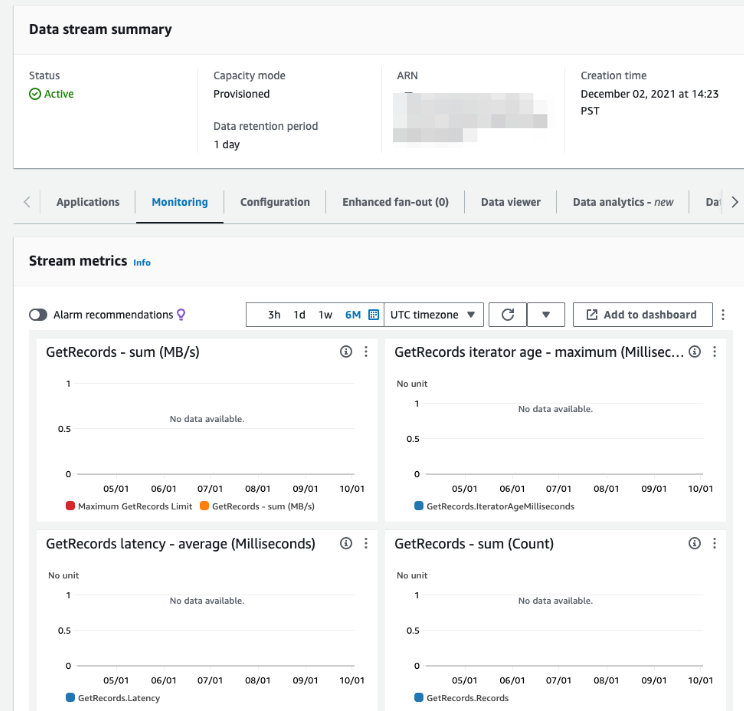
In AWS Console, navigate to the Kinesis service, then select the Data Streams section. Click on each stream to view its details, then go to the Monitoring tab. Review the diagrams over a long period (e.g., 6 months). If you see "No data available", the stream is unused:
How to fix?
Ensure the Kinesis Data Stream is no longer needed before deletion.
In AWS Console, go to the Kinesis service, then select the Data Streams section. Choose the stream you want to delete, then click Actions > Delete.

Note: If the Kinesis Data Streams are provisioned automatically (e.g., via CloudFormation or Terraform), update your infrastructure-as-code (IaC) to reflect these changes.